How Many Colors Should a Paint by Numbers Pattern Have?
We may earn a commission when you buy through links on this page, at no extra cost to you. How this works.
For most photos, 18 to 24 colors is the sweet spot. That's enough for fur, skin and skies to look natural without turning the project into a color matching marathon. Go lower (8 to 12) for kids, cartoons and bold graphic looks. Go higher (30 to 36) only when the subject has subtle gradients and you enjoy mixing paint.
The rest of this guide explains why, with a breakdown by subject and how color count interacts with the other setting that matters, detail level.
Two settings, two different jobs
When you make a pattern in the PaintNumbered tool, you choose two things:
- Number of colors (6 to 48): how many distinct paint colors the photo gets reduced to.
- Detail level: how small the smallest painted area may be.
People often mix these up. More colors doesn't automatically mean more tiny cells, and higher detail doesn't automatically mean more colors. Colors control how realistic shading looks. Detail controls how fiddly the painting is.
A 12 color pattern at high detail can still be full of tiny cells. A 36 color pattern at low detail can be relaxing, with big soft areas of very similar shades. Think about both.
What each color count looks like
6 to 10 colors: poster style
Bold, flat and graphic. Faces turn into a few planes of light and shadow. Skies become one or two blues. It looks intentional, like a screen print, rather than like a failed photo.
Good for: kids, cartoons, logos, pop art portraits, simple flowers, first projects.
12 to 16 colors: clean and readable
Recognizable photos with clear shapes. Landscapes look good here. Portraits start to work but skin can look a bit blotchy. Many beginners are happiest in this range.
Good for: landscapes, buildings, boats, cars, simple pet photos with strong light.
18 to 24 colors: natural looking
Enough shades for gradual shading in fur, faces and sunsets. This is where a custom pet portrait starts to look like the pet and not just "a brown dog".
Good for: pets, portraits, wedding photos, detailed landscapes.
28 to 36 colors: closest to the photo
Subtle transitions, realistic skin, soft skies. The trade off is real though. You'll mix and store more paint, and neighboring colors get so close that telling number 27 from number 31 under a yellow lamp is genuinely hard.
Good for: experienced painters, large canvases (16x20), photos with lots of gentle gradients.
Quick guide by subject
| Subject | Suggested colors | Detail level |
|---|---|---|
| Kids' drawing or cartoon | 6 to 10 | Low |
| Simple landscape | 12 to 16 | Low to medium |
| Building or house | 12 to 18 | Medium |
| Pet portrait | 18 to 24 | Medium |
| Person or couple portrait | 20 to 28 | Medium to high |
| Sunset or sky heavy scene | 20 to 30 | Low to medium |
| Detailed scene, large canvas | 28 to 36 | High |
Canvas size changes everything
The same pattern feels completely different on an 8x10 versus a 16x20. Printed bigger, every area gets physically larger, so you can afford more colors and higher detail without cells becoming impossible.
Rough guidance:
- 8x10 or Letter: up to about 20 colors, low to medium detail
- 11x14: up to about 28 colors, medium detail
- 16x20: anything up to 36, and higher detail is fine
The tool exports PDFs in Letter, A4, 8x10, 11x14 and 16x20 inches, so pick the size first and set colors with that in mind.
The easiest way to decide: try three versions
Because the tool runs in your browser and the photo is never uploaded, testing costs nothing. Generate the same photo at 12, 20 and 30 colors and compare the colored previews at the size you'll print. Usually one jumps out as right. If two look about the same, pick the one with fewer colors. Less mixing, same result. Easy call.
Make a pattern from your own photo
Free and private. Your photo never leaves your device, and the printable PDF is ready in under a minute.
Open the free generatorWhat color count means for buying paint
Here's the good news: a 24 color pattern doesn't need 24 tubes of paint. The palette sheet lists each number with a swatch, hex code and the nearest common color name, so you can mix every shade from a smaller set.
- 6 to 12 colors: a 12 color set will often match most of them directly.
- 18 to 24 colors: a 12 or 24 color set plus extra white and black, and some mixing.
- 30 to 36 colors: a 24 or 36 color set saves a lot of mixing time.
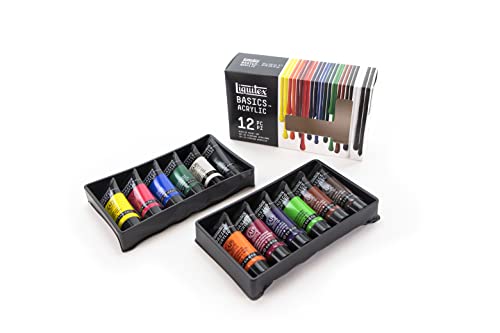
Liquitex BASICS Acrylic Set, 12 Tubes
Enough to mix a 12 to 20 color palette. Medium viscosity and lightfast, a good default for custom patterns.
View on Amazon
Liquitex BASICS Acrylic Set, 24 Tubes
More premixed colors for 20 to 30 color patterns, so most numbers need only a small adjustment.
View on Amazon
Shuttle Art Acrylic Paint, 36 Colors
For 30+ color patterns when you'd rather not mix much. Bottles make it easy to pour into labeled cups.
View on AmazonFor 24+ colors, a palette with lots of lidded wells is close to essential. Mixing a color twice is the worst part of a big pattern.

Airtight Paint Palette With Lid, 30 Wells
Thirty sealed wells, one per number on most palettes, so mixed colors don't dry out between sessions.
View on AmazonMore options in best paint for paint by numbers.
Common mistakes with color count
- Picking 36 colors for a first project. It's tempting because the preview looks best, but you'll spend more time matching paint than painting.
- Picking too few colors for faces. Under about 16 colors, skin often turns into patches. Fine for a stylized look, disappointing if you wanted realism.
- Forgetting the canvas size. A 30 color, high detail pattern on an 8x10 is mostly cells too small to paint.
If you're new, read the beginner tips and the full photo to pattern walkthrough.
FAQ
How many colors do store bought kits use?
It varies a lot by kit. Simple kids' kits use a handful of colors, while detailed adult kits often use 24 or more. The listing usually says.
Is more colors always better?
No. More colors look more realistic, but they mean more mixing and colors that are hard to tell apart. For many photos, 18 to 24 looks almost as good as 36.
Does color count change how long it takes?
Somewhat. More colors means more mixing and more brush rinsing. Detail level and canvas size affect painting time more, because they control how many cells there are.
What's a good color count for a pet portrait?
Start at 20. If the fur looks flat in the preview, go up to 24 or 28. If the eyes are lost, raise the detail level rather than the colors.